Showing posts with label Apple. Show all posts

Wednesday, November 28, 2007

Extraordinary Machine - 3

It's very late and I'm wide awake, propped up on some pillows in bed with my new MacBook Pro. I'm still familiarizing myself with Leopard. It seems like there's some dazzling new discovery around every corner. I've got Thievery Corporation playing in iTunes, and everything is cool blue and silver, just like in Heaven. I know this is crazy, but this computer—I feel that it loves me.

Real moonlight, full night moon, variable moon, daylight only...

I'm trying out some new software. I've got the EarthDesk demo installed and it's very pretty, even though it says "NOT LICENSED - Evaluation Use Only" right across the African continent. It reloads the composite satellite image of the planet as often as you want, and it will render in a number of different formats, but even though it follows the rotation of the earth, it's still just the same desktop image over and over. Even toggling the options, it's not going to get much more interesting. I'm not inclined to spend money to keep it.

A copy of iLife came installed on the computer, but if it hadn't, I'd pay the $78 to buy it, merely for the iPhoto upgrade, although Garage Band is cool, too. I used it to record a CBC radio broadcast that I had running in Quicktime. And here's the thing that's great about Apple: whatever way you can think of to do something, more than likely the programmers have thought of it, too. I had never even seen Garage Band before, and three minutes after launching it I was recording live radio in it. That was encouraging. Maybe I'll learn to podcast.

I'm on the fence about MarsEdit. It's a handy little program for composing and uploading blog posts. Though I like its simplicity, its features are quite limited. The preview feature is nice, and the idea of having all my draft posts stored in one location where I won't forget about them is tempting, but I think the next generation of these will be much improved. I can't figure out how to insert an image into a post. If it was an Apple program, it would be readily apparent how to do something like that. I have yet to try to upload a post from it, but I'll try it out with this one and see how it works.

[edit: it worked well. Okay - I'm off the fence.]

One program I am going to pick up is Mindmap Pro. It provides you with the means to create a graphic map of your ideas with little more effort that it takes to make notes. In fact, it makes notes for you, putting your mapped ideas into a structured outline that you can use as a template for your writing. I test-drove it by making a map prior to writing these three posts, and that convinced me that I'll get good use out of it.

Okay—I saved the best for last: Apple Mail—the most sublimely simple and beautifully designed mail program that ever was. It's streamlined to perfection, with all the little details taken care of out of view. There is nothing about this program that annoys me. For instance, I am so over bouncing icons that alert me to new mail. Now when I get mail, a pleasant electronic purr sounds, and a number appears on the icon in the dock, indicating how many new items are waiting. It's all very civilized. Although there are many ways to manage incoming information, search retained mail, activate items in iCal, and even leave oneself notes and to-do lists, there are no extraneous functions to clutter the thing up and provide me with details I will not stay on top of. On the other hand, you can handily add in all the extra functions you want.

I've got you where I want you.

Photo 8.jpgMy favorite feature allows me to put the RSS feeds for all your blogs into Mail, so that new posts and comments show up in my mailbox promptly after you post them. Each feed comes into its own separate file in the inbox, but if I place all the feeds into a folder, I'll get an aggregate of all the blogs that I can access with a single click. I used to have a hard time keeping up with what people are posting, but no more. Now it all shows up on my doorstep. This does take some of the joy of discovery out of it, but the added consistency and convenience make it more than worth the trade. In addition to the blog feeds, I've got BOTF and a few other Slate locations tucked into another folder. Best of the Fray posts are even stranger this way—like alien missives when they arrive, anonymousely, in my inbox. If I can bring myself to read one of them, I will try to guess who wrote it. I'm about half right, so far. They're no more readable here than they are on BOTF, but my guessing game is mildly interesting. I only wish I could assign those posts the alert sound that resembles an electronic fart, but it's one sound for everything, alas.

I just love that I get alerted to whatever you post shortly after you post it. I imagine that if I turned the alert sound up while I was taking a nap, the notification would wake me up. I can get my Mac to read your posts to me, too. I tried it the other day. It was fun. I might do that some more. I could run through all the different voices and pick a unique one for each of you. It would almost be like you were reading to me, wouldn't it?


[the pictures of me in these posts were all taken with the MacBook Pro's webcam]

Tuesday, November 27, 2007

Extraordinary Machine - 2

I'm lying on the couch, half asleep, with Sweetpea stretched out across my lap, and I've got my new Apple keyboard propped against him as I write this post. He doesn't seem bothered by this, which is testament to the graceful unobtrusiveness of the device's design. If this keyboard were a human being, it would be a young poet. It's amazingly thin and sensitive, and it connects wirelessly to my laptop from up to sixty feet away. Like the keyboard, the wireless Mighty Mouse is blue-tooth enabled, with laser tracking and state-of-the-art functionality. Honestly, though, the mouse, nice as it is, has nothing on the laptop's trackpad, which gives me the ability to move the cursor, drag and drop, double click, and scroll horizontally and vertically, all by tapping or sliding one or two fingers on the flat surface. I've got all the options turned on, and the settings set to their highest sensitivity, so I can practically just breathe on the trackpad and it does what I want. I also purchased a cable that allows me to hook my laptop up to my television and turn it into a second desktop upon which I can manipulate objects via the wireless mouse and keyboard. Do I need to do this? Of course not, but it will come in handy if I can convince my brother to teach me Photoshop. Peering over someone's shoulder is not the optimal way to learn, or to share things one is working on, or reading online.

I also picked up a little microphone accessory last week that pops into the bottom of the iPod Nano, and now I'm speaking into that, recording this post instead of typing it. I'm still lying on the couch with Sweetpea stretched out on my lap and the keyboard propped against his butt. He's snoring quietly. The laptop is on the coffee table beside me and the bluetooth mouse is on the couch by my hip. Scooter's sitting on the table, observing the scene with an expression of mild disdain, but I am not the least bit ashamed of my self-indulgence. With the flexible stem on the mic, I can prop the voice recorder on my chest so I don't even have to hold it, which is great because at the moment, holding it seems like entirely too much trouble.

All I need now is a blue tooth phone that will sync with my mail program, and maybe a telescoping arm that would suspend the MacBook above me as I lie here on the couch. Other than that, I'm well equipped. I can even go out in style: I have this big square Calvin Klein shoulder bag that my mom gave me for Christmas last year. It's grey satiny fabric with silver leather straps and accents, and it matches my laptop as though it were specifically designed to carry it. At some point I'll need to pack my Mac up and go out, but right now I'm too sleepy to go anywhere.

If only I had voice-recognition software that would transcribe this recording into a word document, but alas, I'm going to have to do that myself. But not right now. Right now I'm just going to lie here and flirt with sleep until it either overcomes me or gives up and goes elsewhere, and even then, I probably won't get up. In fact, if I didn't have to get up to eat or go pee, I think I could lie here forever. If I got bored, all I'd have to do is pick up the tiny laptop remote and open Front Row, the sleek new platform for accessing iTunes, iPhoto, DVDs, and video. I could watch a DVD or listen to a lecture without hardly moving a muscle, and since my brother has hooked up my stereo so that I can run iTunes through it, I have access to good-quality sound—not that my little Bose earbuds are deficient, but you can only wear those things for so long, and I'm going to be here a while. If I get lonely, I can get on iChat and visit with a friend. If I want to send an email, I can type it on the little keyboard, and even take a picture of myself to send along with it, without even getting up to get my camera, without getting up at all.

Wow, it's really freezing outside. I can feel the chill from here. If I could, I'd bribe someone to come and put on a fire. And perhaps as long as they were coming to build a fire, they might bring me some movies. And a four-shot latte. God—I'm sleepy! It must be winter. I could stay here, cocooned like this, for the duration. I have a huge jug of protein powder, a box of mandarin oranges and a dozen packages of ramen noodles. That should keep me for a while. I don't need to leave the house. Sleep is pulling me down. I'm hibernating.

Monday, November 26, 2007

Extraordinary Machine - 1

Although my seven-year old Mac Pismo had proven perennially expandable and well nigh indestructible, it was having trouble keeping up with its younger siblings and it wouldn't accept some of the new software upgrades, so on Friday evening two weeks ago I stopped by the Mac store and got a shiny new 15" MacBook Pro.

A new Mac! Too excited to wait until I got home, I opened up the box while I was waiting for takeout. As people around me were wolfing down their messy chili fries and poutine, I removed the styrofoam biscuit and slipped my new laptop out the envelope of soft fabric that enclosed it. The packaging was sleek and functional, but I wouldn't have been surprised to find the device tied up with colourful ribbons or folded inside a large square of silk, like some sacred temple artifact.

The brushed aluminum surface was like cool satin under my fingertips. I touched the button on the front and the cover popped open as if eager to grant me entry. I pressed the power button and the screen came to life in a fan of aurora borealis colour over top of a black, star-speckled backdrop. An ambient groove played over the small speakers, welcoming me to the Leopard experience. I stroked the silver keyboard and trackpad and felt something akin to religious awe, as if in those moments a small cluster of winged sylphs had emerged from the machine and now hovered in the air above my head.

And then my food was ready, and I hastened to put the computer back in its box and collect my order. At home, after dinner, the machine led me through the set-up procedure and I completed forms with my personal information. Suddenly my face appeared in the on-screen window and the set-up assistant instructed me to press the red camera icon. When I did this the screen flashed bright white. The assistant asked me if I wanted to use the resulting photo on my profile. "Sure," I said. "Why not?"

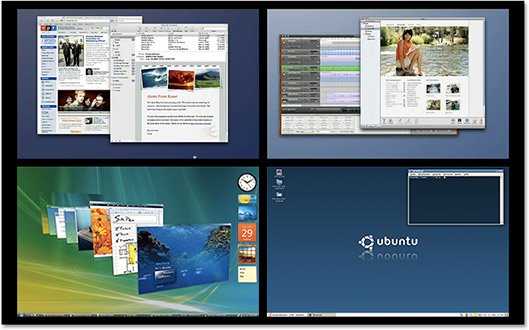
Once the computer and I were properly introduced, I set about familiarizing myself with the new environment. Among the many new features included in the upgrade, Leopard introduces some fresh solutions for organizing your work. Mac users no longer have to wade through a desktop cluttered with downloaded files, or find that they've lost track of their primary task under a pile of open application windows. In Leopard, the workspace is fluid and flexible. It expands, breaks, slides, flips, pops open and folds back up again. Apple has always been known for creating intuitive and redundant processes, and 10.5 maintains that tradition: you can access different views by mousing into the corners or the edges of the screen, by selecting items in the dock, by mouse clicks and by F-key commands.

Two new features provide novel ways to manage files and workspaces: Stacks sit in the Dock, and with a click they pop open vertically, revealing all your downloads or documents in a long chain. Spaces allows you to multiply your desktop and put different groupings of work on different desktops. To move work around between desktops, you just drag it from one space and drop it into another.

Except for the addition of a reflective silver platform, the Dock is the same, but the Dashboard is new. Dashboard is Apple's answer to widget-based user-built spaces like those offered by Firefox, Google, Opera and Netvibes. And as usual, Apple does it better: not only can you create your own Dashboard widgets directly from Safari with a simple clip and drag, you don't even need to open a browser to access your widgets for Wikipedia, Google, Calendar, Mail, YouTube, iTunes, Movie or TV schedule, Weather, Calculator, Yellow Pages, and many others. Clicking on the speedometer icon in the Dock brings your custom Dashboard to the forefront, overlaying and dimming other items on your desktop. Another click and the dashboard slides away, leaving your desktop as it was.

Time Machine is a automated back-up function that makes copies of all your files at regular intervals and stores two weeks of changes on an external hard drive, so if you lose something, you only have to scroll back through Time Machine's chronological files to locate the version you need.

The updated Finder adds a graphic preview feature that shows the contents of a file sliding across a mirrored black stage. Each image or document or application appears in miniature and takes its place in the spotlight when you scroll to it or click on it. This allows you the convenience of viewing the contents of your file in the Finder window before opening it up on the desktop.

This brief review covers only a small part of the magic that is MacIntosh. Stay tuned for part two, coming tomorrow.